Announcements
Address changes, corrections to registration or updating of personal information may require adjustments to the electoral register.In this guide, you will understand how to update data in the e-Title and in the electoral register without complication, using the online services of the Electoral Justice.
Is it possible to update data by e-Title?
Many people believe that all changes can be made directly by the application, but most of the updates are carried out by the Electoral Justice portal.
📲 O e-title App it mainly works as access to digital documents and some services, but changes in the electoral register are usually made by Electoral Self-Service of the TSE.
👉 Access the official service:
https://www.tse.jus.br/voting services/self-service-electoral#/
once the update is approved, the information will also appear in the application.
⚠️ Attention! This may take a few days as the data needs to be processed in the Electoral Justice system.
How to update electoral address
One of the most common changes in the electoral register is the change of address or electoral address.
This can happen when the person:
- change city
- neighborhood change within the same municipality
- you need to change the voting location
📌 To update online:
1️⃣ Access the Electoral Self-Service
2️⃣ Click “Electoral Title”
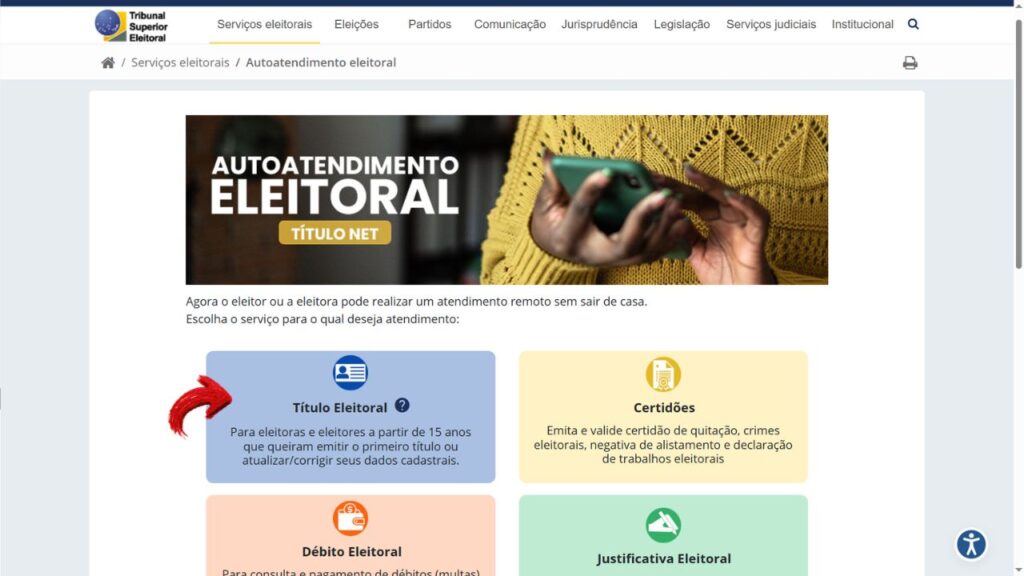
3️⃣ Select “Update or correct your” election title
4️⃣ Choose the option “Update your” address or “Touch your” voting place
During the process, it will be necessary to attach a proof of recent residence.
documents such as: are usually accepted
- water bill
- light bill
- phone bill
- other recently issued vouchers

How to correct data in the electoral register
In addition to the address, it is also possible to correct personal information recorded in the voter title.
Among the most common changes are:
- correction of first name or surname
- update after marriage or divorce
- inclusion of social name
- update of filiation
📄 To make these changes, you usually need to send:
- official document with photo
- documents proving the change, as a marriage certificate or new identity
The system also allows updating social data, such as information about disability, gender identity, or belonging to traditional communities.
These options are available on the own Electoral Self-Service.
When face-to-face care is needed
Although many services can be done online, there are situations where the voter needs to look for the electoral registry office.
⚠️ This can occur when:
- there's problems in the electoral register
- the data they are not recognized by the system
- title is suspended or cancelled
- additional documents need to be submitted
in some cases, face-to-face care is also required for biometric collection or complete regularization of the registration.
If there are doubts about the electoral situation, the voter can consult directly the TSE Portal.
How to check if the update has been completed
After you request the change, it is important to verify that the update has been processed.
this can be done in two ways:
1️⃣ For Electoral Self-Service: In the portal itself it is possible to access the option “Accompany a” request and check the progress of the order. Visit the Electoral Self-Service website.
2️⃣ Hair e-title App: After a few days, open the application to check if the data has already been updated.
⚠️ Changes may take a few days to appear in the app.

If the information is not yet up to date, it may be necessary re-authenticate in the application or wait for system processing.
Keeping the electoral register up to date is a way to avoid problems and ensure access to various services. Now that you know how to update data in the e-Title and in the electoral register, it is easier to correct information and maintain your regular situation with the Electoral Justice.
