Announcements
Want to have your CNH always at hand on mobile, but do not know where to start? In this guide, you will understand exactly how to download the document in the CNH app of Brazil, what is needed and how to avoid common errors during the process.
How to download the CNH document in the CNH app in Brazil
If you want to download the document in the CNH app in Brazil, the process is simple, but requires that some requirements are correct.
See the direct step by step:
1️⃣ Download official app
- Android: https://play.google.com/store/apps/details?id=br.gov.serpro.cnhe&hl=en_BR
- IOS: https://apps.apple.com/br/app/cnh-do-brasil/id1275057217
2️⃣ Log in with your gov.br account
Use your registered CPF and password.
3️⃣ Create an access key
🔐 Set a 4-digit code to access the document later.
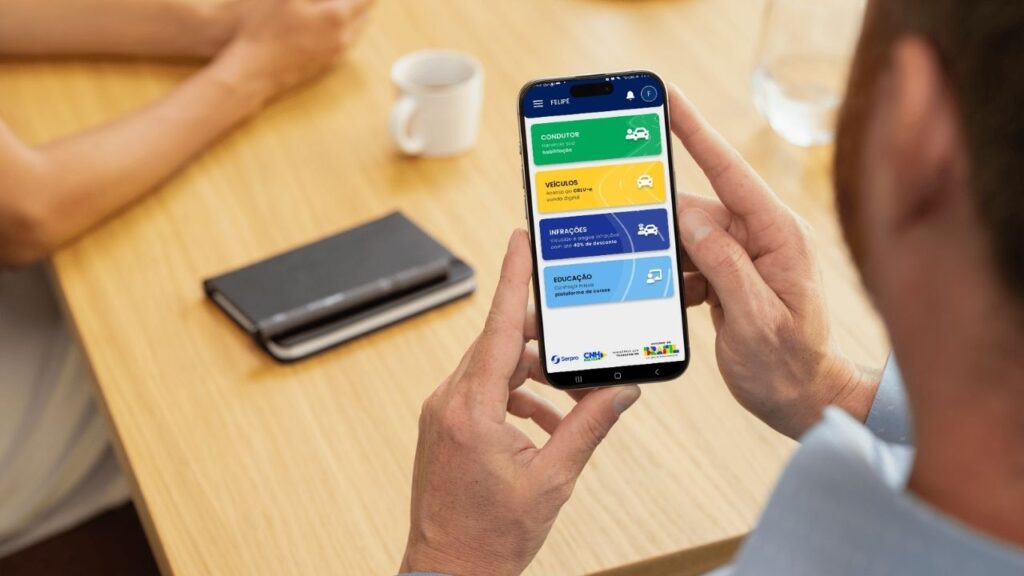
4️⃣ Tap the “Conductor” button
From the app home screen, select this option to follow.
5️⃣ Access the option “Habilization”
On the next screen, tap this button to start the process.
6️⃣ Follow the on-screen instructions
If everything is correct, the CNH will be released on your mobile phone.
📌 In practice, downloading the document in the CNH app of Brazil takes a few minutes 'provided your data is up to date.
Main functions available in the application
The app goes far beyond just showing the CNH. It concentrates several important features. Among the main:
CNH Digital
- access your license by mobile
- present in inspections
- query document data
CRLV Digital
- vehicle document available in the app
- possibility to share with third parties
⚠️ Fines and infractions
- consult registered infractions
- issue tickets for payment
🔄 Monitoring of processes
- check CNH situation
- accompany renewal
- view updates
These functions make the app a practical tool for the driver's day to day.
Who can use the CNH app in Brazil
The app is available to a wide audience, but there are some requirements. You can use if:
- has CNH valid
- or possess CRLV vehicle
- have an active account in gov.br
brazilians and foreigners with regular documentation can access the app.
⚠️ ATTENTION: Without registration on gov.br or with inconsistent data, access may be limited.
How to access your CNH within the app
Once you've signed in to the app, the path to accessing your enable is simple:
1️⃣ On the home screen, tap “Conductor”
2️⃣ Then tap “Habilitation”
If your CNH is already released, it will automatically appear. If it does not appear, you may need to:
- activate document
- validate your data
- or correct information
This is one of the points that most generate doubt AND is usually linked to the activation step.
Advantages of using the app on a daily basis
Using the CNH app in Brazil brings practical advantages that make a difference:
quick access to the document
security with encrypted data
operation until no internet (after download)
economy with impressions and displacements
centralization of services in one place
In practice, you reduce bureaucracy and gain more control over your situation as a driver.
Situations where the app may not work properly
Although practical, the app may have limitations in some cases. The most common are:
- outdated data in Detran
- problems with gov.br account
- CNH without QR Code
- validation failures
📌 When this happens, it is usually not an error in the app UDO but an inconsistency in the data.
Tips to use the app without problems
Some simple practices help to avoid mistakes:
- keep your data up to date
- use only the official app
- check your login at gov.br
- keep the app up to date
These precautions prevent most of the problems reported by users.
The CNH app of Brazil works as a central practice to solve issues of your habilitation without bureaucracy. Knowing how to download and use correctly is what allows you to enjoy everything it offers on a daily basis.
