Announcements
CNH Digital should appear on mobile in a few minutes, but any difference in registration can block the document. Before blaming the application, it is important to check if your enablement meets the requirements and if the validation was completed correctly.
Who can use CNH Digital in the CNH app in Brazil
The digital version of the driver's license is available for drivers with registered license in the official transit bases.
To access the document through the application, it is usually necessary:
- have a valid and regular CNH;
- ✅ Have CPF correctly linked to the qualification;
- ✅ Keep an active Gov.br account;
- ✅ Have the personal data updated;
- ✅ Use a mobile phone compatible with the application;
- Complete the identification steps requested by the system.
Brazilian and foreign drivers qualified in Brazil can use the resource, provided that the documentation is regular and associated with the CPF used in Gov.br.
In many cases, the CNH appears automatically after the first access. When this does not happen, the application can request a complementary validation.
What is CNH Digital and how it works
What is CNH Digital and how it works
CNH Digital is the electronic version of the national driver's license.It gathers the same information present in the physical document and has legal validity throughout the country.
After being added to the CNH app in Brazil, the license can be presented in inspections directly through the mobile screen.
The document is protected by security mechanisms such as:
- 🔐 Password or access key;
- Biometrics of the apparatus;
- Validation of the identity of the driver;
- QR Code for authenticity conference.
After the first download, CNH Digital can also remain available without an internet connection.
This allows the driver to open the document during an inspection even when there is no sign of mobile data.
to present the digital version, the phone needs to be working, unlocked and with enough battery.
How to activate CNH Digital in the app
Activation is the procedure that confirms the identity of the driver and releases the document into the account.
First, install the official app:
👉 Android:
https://play.google.com/store/apps/details?id=br.gov.serpro.cnhe&hl=en_BR
👉 IOS:
https://apps.apple.com/br/app/cnh-do-brasil/id1275057217
Then follow these steps:
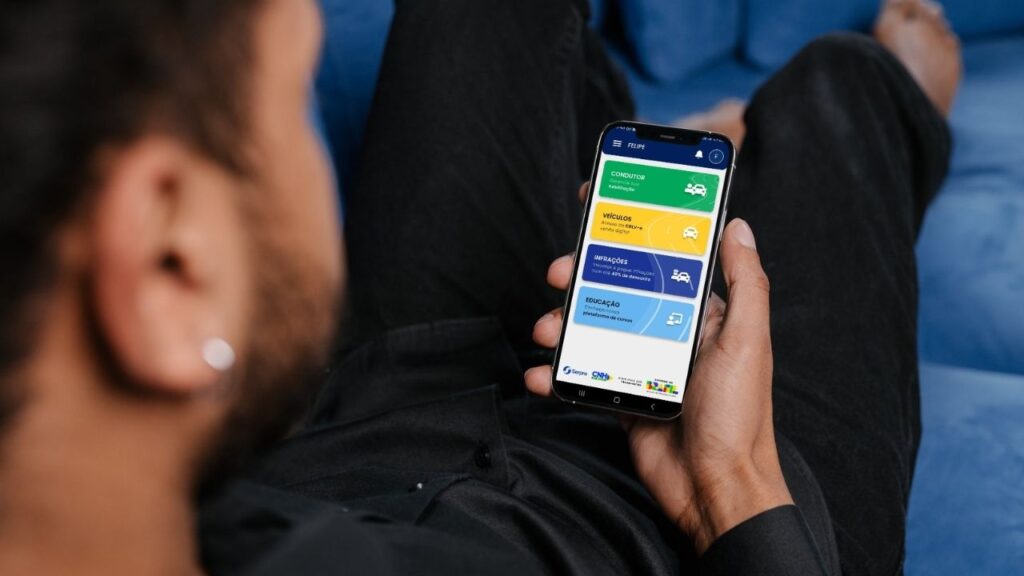
1️⃣ Open the CNH app of Brazil.
2️⃣ Log in with the CPF and password of your Gov.br account.
3️⃣ On the home screen, tap the area “Conductor”.
4️⃣ Select the option “Habilitation”.
5️⃣ Wait for the automatic query of the information.
6️⃣ If requested, complete the validation presented on the screen.
During this process, the app may ask:
- 📸 Facial recognition;
- 🔳 Reading CNH QR Code;
- 📍 Confirmation of the CEP;
- 📝 Conference on personal data;
- 🔢 Information of some document code.
When all information is confirmed, the enable will be added to the app.
Does CNH need to have QR Code?
The licenses issued in the latest models have a QR Code on the back, used to verify the authenticity of the document.
This code began to be included in CNHs issued from 2017 and can be requested in some activation processes.
Drivers with older documents may encounter limitations when adding the enablement to the app.
In this case, it is worth checking with the issuing Detran whether it is necessary to request a new document or complete another validation procedure.
QR Code should not be confused with CNH security code.Each information has a different function during document confirmation.
What data needs to be up to date to use CNH Digital?
Activation depends on comparing the information recorded in different official systems.
Therefore, it is worth checking:
- 📋 Full name;
- CPF;
- 📋 Date of birth;
- 📋 E-mail;
- 📋 Phone number;
- 📋 Address and ZIP code;
- 📋 Number of habilitation.
Differences in name spelling, surname changes, or old registrations may prevent automatic confirmation.
It is also important to check if the Gov.br account used belongs to the same CPF linked to CNH.
Why does CNH not appear in the app?
One of the most common problems happens when the driver normally enters the app, but the license is not displayed.
The main causes include:
- ❌ Divergent data between Gov.br and Detran;
- ❌ Issue process not yet completed;
- old CNH without digital integration;
- ❌ Incorrect or irregular CPF;
- facial validation not finalized;
- ❌ Outdated application;
- Temporary instability of the system;
- ❌ Login made to another account Gov.br.
Before seeking service, update the application, log out of the account and make a new access.
If the document remains unavailable, check the status of the license with Detran.
What does the CNH Digital validation error mean
When the application informs you that it was not possible to validate the CNH, it does not necessarily mean that the wallet is suspended, expired or invalid.
Most of the time, the message indicates that the system has failed to confirm any information.
This can occur when:
- ⚠️ The name is different between the registers;
- ⚠️ The document number was entered incorrectly;
- The facial image has not been recognized;
- QR Code has not been read;
- ⚠️ There is some outdated information;
- ⚠️ The Gov.br account does not have sufficient validation.
As it is an official document, the platform blocks the release whenever it can not confirm that the CNH belongs to the connected user.ran needs to ensure that the digital document is linked to the right person.
How to correct the data of the Gov.br account
When the problem is related to the Gov.br account, go to:
Make sure your personal information is correct and update your contact details when necessary.
It is also recommended to check:
- ✅ If the CPF used at login is correct;
- ✅ If the registered phone is still active;
- ✅ If the email can be accessed;
- If the name appears complete;
- If there is no other account linked to the same user.
changes made to Gov.br may not appear immediately on other systems.In some cases, it may be necessary to wait for the update of the databases.
What to do when the data does not
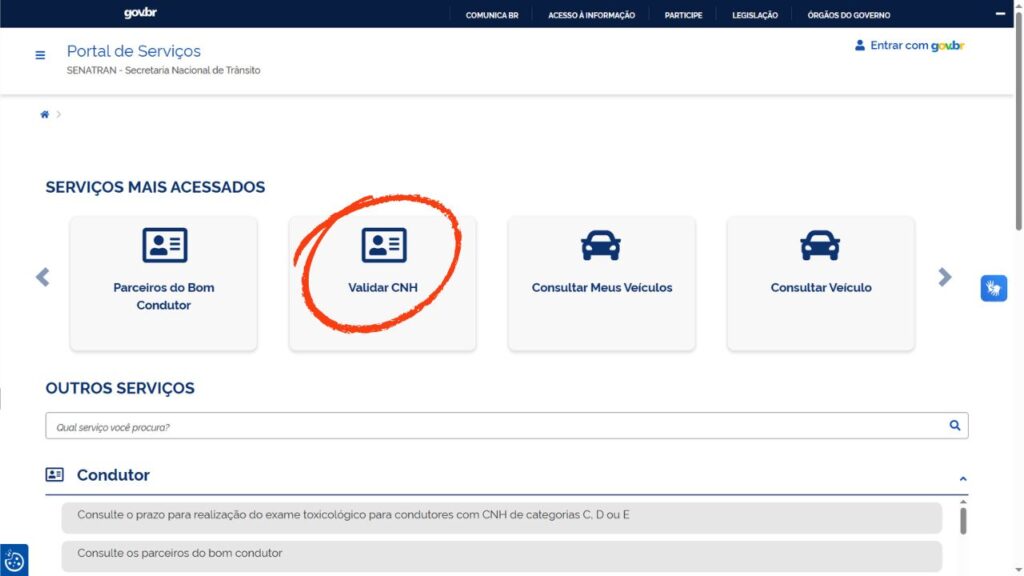
🔍 The driver can also consult the services available on the official Senatran portal:
You can use the official portal to validate your CNH:
🔗 https://portalservicos.senatran.serpro.gov.br/#/home
Path:
- login with gov.br
- access driver area
- click on “Validar CNH”
Depending on the service available, you may need to inform:
- CPF
- CNH number
- security code
📌 This query helps confirm that the license is correctly registered and that there are any pending issues related to the document.
How to solve problems with CPF
The CPF is the main information used to relate the Gov.br account to the driver's license.
When there is any irregularity or divergence, the activation of the Digital CNH can be blocked.
Check if:
- CPF is regular;
- 🚨 The number registered in the CNH is correct;
- The name is the same on official bases;
- 🚨 The date of birth does not differ;
- 🚨 The login was done in the correct account.
If there is any pending in the CPF, regularization should be done with the responsible body before attempting a new activation.
Difference between activating and downloading CNH Digital
These two procedures are not the same thing.
Enable CNH Digital it means validating the identity of the driver and authorizing the inclusion of the document in the application.
Download CNH Digital it means saving a document that has already been released on the device.
therefore, the download can only be done after the activation is complete.
When CNH appears in the app but does not open without internet, the document has probably not been saved for offline access yet.
Does CNH Digital replace the printed document?
Yes. The version available in the application has the same legal validity as the physical document.
The driver can present it in traffic approaches, inspections and other situations that require proof of the license.
Even so, it is important to consider some precautions:
- 🔋 Keep the phone charged;
- 🔐 Know the password or access key;
- Download the document for offline use;
- 🛠️ Confirm that the app opens normally;
- 🚫 Do not display photos or screenshots in place of the document opened in the app.
The inspection can verify the authenticity through the tools available in the digital document itself.
Tips to avoid problems during activation
A few simple steps increase the chances of completing the process without errors:
- 💡 Update the app before you start;
- Use a stable connection;
- 💡 Clean the camera from the mobile phone;
- Do facial recognition in a lighted place;
- Remove sunglasses, cap or accessories that cover the face;
- 💡 Carefully check each information entered;
- do not use links sent by third parties;
- download only from official stores.
If facial validation fails several times, avoid repeating the procedure quickly. Close the app, check the lighting conditions, and try again.
Where to seek help when the problem continues
When all the information is correct and the license still does not appear, the driver should look for the official channels.
The main options are:
- 📞 Support of digital traffic services;
- 🏢 State in which the CNH was issued;
- 🌐 Senatran Service Portal;
- 🔐 Attendance related to the Gov.br account.
When contacting, have the CPF, the CNH number and the error message presented in the application.
A CNH Digital it offers more convenience for the driver, but its release depends on the confirmation of the data registered in the official systems. With the Gov.br account active, regular documentation and updated information, the qualification can be activated and accessed directly by the CNH app of Brazil.
