Announcements
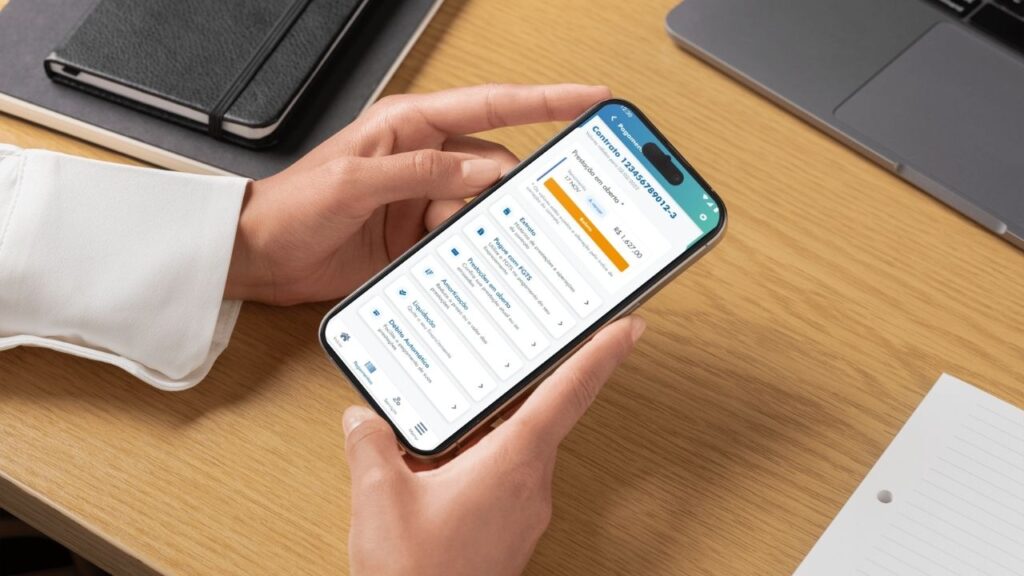
Who has a housing contract with CAIXA can track parcels, issue tickets and check proposals directly by mobile. For this, simply download the Housing CAIXA app and access the digital services available to customers and future real estate buyers.
What is the App Housing CAIXA
🏦 The Housing CAIXA App is the official application of CAIXA Economica Federal for real estate financing services.
It allows the user to simulate, request and monitor housing financing, in addition to managing existing contracts directly through the smartphone.
Among the main services available in the application are:
- 📊 Simulation of real estate financing
- 📄 Submission of funding proposal
- 🏠 Monitoring of credit analysis and property
- Consultation of financing installments
- 🧾 Issuance of tickets and second way
- 📉 Consultation of balance due
- 💰 Simulation of amortization or early discharge
- 📑 Consultation of data and statements of the contract
💡 In practice, the app acts as a digital dashboard of housing finance.
In many cases, the whole process can be done online & it is necessary to go to the agency only for the final signature of the contract.
Where to download the official app
📥 The app can be downloaded for free from the official app stores.
To download the Housing CAIXA app, use only the official links:
📱 Android (Google Play):
https://play.google.com/store/apps/details?id=br.gov.caixa.habitacao&hl=en
🍎 iPhone (App Store):
https://apps.apple.com/br/app/habita%C3%A7%C3%A3o-box/id958983592
⚠️ Attention! Avoid downloading apps outside the official stores to ensure the security of your data.
After installing, the application will be ready for access with the BOX Login.
How to install the app on your phone
📲 After downloading the Housing CAIXA app, the installation happens automatically on most mobile phones.
The process usually works like this:
1️⃣ Access the Google Play or App Store
2️⃣ Search for Housing BOX (or click directly on the links in the previous topic)
3️⃣ Tap Install
4️⃣ Wait for the download to complete
5️⃣ Open the app on your phone
💡 In a few seconds the app will be available for use.
In the case of cell phones Android, the system needs to have version 6.0 or higher to ensure compatibility.For iPhones, it is necessary to have iOS 14.3 or later.
How to create access to the application
to use the application, you must have a BOX Login. This same login is used in various digital services of the bank.
If you do not have a registration yet, just:
1️⃣ Open the application after installing
2️⃣ Select the option New user
3️⃣ Inform CPF or email
4️⃣ Create a access password
5️⃣ Confirm the requested data
✔️ The whole process can be done directly by mobile phone.
📲 If you already use other CAIXA applications (except Internet Banking), can use same login and password.
How to Log in to the Housing CAIXA App
🔑 After creating the registration, access to the application is simple.
Login works as follows:
1️⃣ Open the app on your phone
2️⃣ Type CPF or email
3️⃣ Inform your login Password BOX
4️⃣ Tap Enter
In some cases, the system may request security questions related to the housing contract.
📌 These checks help protect user data.
How to access funding through the app
🏠 Who already has housing financing in CAIXA can follow the contract directly through the application.
After entering the system, the user can:
- consult contract information
- check financing tranches
- follow balance due
- access contract statements
📊 The app brings together more than 50 services related to housing financing, allowing to solve several demands without having to go to the agency.
How to access proposal under analysis
The app also allows you to track funding proposals that are still under review.
In the app itself, the user can check:
- if the proposal was received by CAIXA
- if they exist pending documents
- the result of credit analysis
- a property valuation
- the forecast of contract signing
💡 To do this, simply access the section “My Proposals” in the main menu.
Is the Housing Caixa app safe?
🔒 Yes. The application uses the security systems of CAIXA itself.
Access is made with the BOX Login, which requires authentication by:
- CPF or email
- registered password
- security questions (in some cases)
In addition, the application should be downloaded only in the official shops, which reduces risks of fake versions.
Common problems accessing the app
Like any banking application, some problems can happen during access.
The most common include:
- login error
- application that does not open
- momentary instability of the system
- incorrect password
in most cases, the problem can be solved restarting the application or updating the installed version.
Error logging in to the app
🔑 If you see an error when trying to enter the application, check:
- if the CPF or email was typed correctly
- if a password is correct
- if the app is updated
If the error persists, it may be necessary reset Login password BOX.
What to do if the app does not open
If the app does not open or crash when starting, some simple solutions can help:
✔️ Update the app in the app store
✔️ Restart the mobile
✔️ Check internet connection
✔️ Reinstall the app
💡 These actions usually solve most technical problems.
How to regain access to the app
🔄 If you forgot the password of the Login BOX, it is possible to recover it.
The procedure usually involves:
1️⃣ Access the option I forgot my password
2️⃣ Inform CPF or email
3️⃣ Confirm security data
4️⃣ Create a new password
After that, just open the app again and log in.
When to seek care from the Box
☎️ In some cases, it may be necessary to seek support directly from CAIXA.
This can happen when:
- login access is not recovered
- there are problems in the housing contract
- the application presents persistent error
- there are doubts about funding
The main service channels are:
📞 Hello BOX
Capital cities and metropolitan areas: 4004 0104
Other regions: 0800 104 0104
🕗 Attendance of CAIXA Digital Agency:
- Monday to friday: 08h to 18h
It is also possible to seek help from official Caixa service website.