Announcements
Even without the physical card, today it is possible to consult the SUS number by CPF directly by mobile. The My SUS Digital application allows you to view the digital National Health Card and access your data registered in the public health system.
How to see the SUS number by the CPF
📱 The SUS number can be consulted online using My SUS Digital.
If you do not have access to the system yet, you can use the official channels:
📲 Download the app for Android (Google Play)
https://play.google.com/store/apps/details?id=br.gov.datasus.cnsdigital&hl=en_BR
🍎 Download the iPhone app (App Store)
https://apps.apple.com/app/my-sus-digital/id1045754608
🌐 Access the web version of My SUS Digital
https://myususdigital.saude.gov.br/login
After accessing the application or website:
1️⃣ Log in using your gov.br account.
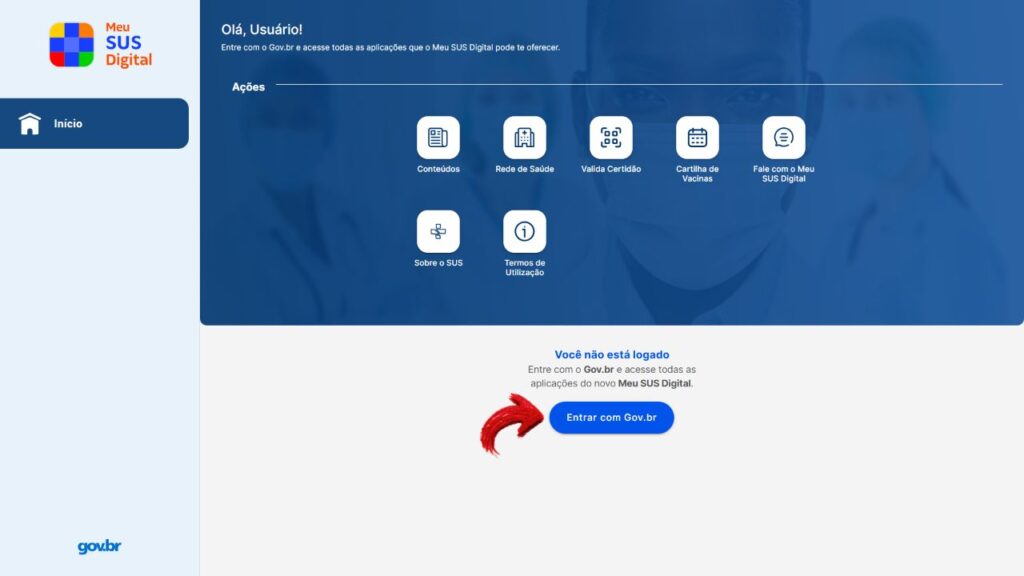
2️⃣ Enter the main area of the system.
3️⃣ Open the menu of your profile.
📌 The system automatically identifies the citizen by the CPF used in the gov.br account. If you don't have an account, here we have already shown the step to create your own.
the Ministry of Health has adopted the CPF as the main identifier of the Unified Health System, which helps unify records of care, testing and vaccination in a single register.
In practice, this makes it easier to consult the SUS number by CPF, reduces registration errors and improves the organization of citizen health information.
Where to find the National Digital Health Card
🪪 Within the application, the SUS number appears in the National Health Card (CNS) digital.
To locate the card:
1️⃣ Open the profile Menu in app.
2️⃣ Look for the SUS card icon.
3️⃣ Tap the card to view the complete data.
When opening the digital card, the system can show:
- 📄 national Health Card (CNS) Number
- 👤 user's photo
- QR Code identification
📲 This digital card works as a virtual version of the physical card.
thus, even without the printed document, the citizen can present the SUS number by the CPF consulted in the application during care in health units.

What to do if the SUS number does not appear
⚠️ In some cases, the user can access the application and realize that the SUS number does not appear in the profile.
This can happen for a few reasons, such as:
- divergence between data registered in the gov.br and the SUS system
- incomplete registration in the health system
- temporary instability of the platform
- momentary data synchronization failures
📌 When the problem is system related, it is often enough to try to access again later.
It is also important to check if:
- the login of gov.br account is working properly
- the personal data registered are correct
- app is up to date.
How to update registration in SUS
if the problem is related to incorrect or outdated data, it may be necessary to update the registration in the SUS system.
⚠️ Attention! These amendments they cannot be done directly in the app.
To update information, the citizen must:
1️⃣ Search for one Basic Health Unit (UBS) or another health facility.
2️⃣ Request the update of the registration in the system.
3️⃣ Present documents for identity confirmation.
Usually requested:
- identification document with photo
- proof of residence
- national Health Card Number (if available)
📌 After updating the data in the health unit, the information usually appears in My Digital SUS.

Why some people have two SUS numbers
some people may realize that they have more than one National Health Card (CNS) number registered.
This usually happens when they exist old or incomplete records in the SUS system, each registration can generate a different number of cards.
In many cases:
- cards initiated with number 7 indicate registration with better data quality
- the system automatically uses the card considered as main card
📌 My SUS Digital does not create new SUS card numbers. The application only displays the data that already exists in the national health system.
With the adoption of the CPF as the main identifier of SUS, the trend is that these cases of multiple numbers decrease, since the records are now linked to a single document.
