Announcements
Your license can be available on your phone in a few minutes, but an incomplete registration or the wrong application can prevent access. Here's how to install the CNH app in Brazil, add your CNH Digital and take advantage of the services available to drivers.
How to download and install the CNH app in Brazil
The first care is to install the official version of the application. There are pages and programs with similar names, so the download should be done only by the official stores of Android and iPhone.
Follow these steps:
1️⃣ Access the app store on your mobile phone
Those who use Android should open the Google Play Store. On the iPhone, the download is made by the App Store.
Android:
https://play.google.com/store/apps/details?id=br.gov.serpro.cnhe&hl=en_BR
IOS:
https://apps.apple.com/br/app/cnh-do-brasil/id1275057217
2️⃣ Tap “Install” or “Obter”
Wait for the download to complete and open the application only after the installation is finished.
3️⃣ Login using your Gov.br account
Enter your CPF and the password registered in Gov.br. This identification is necessary because the application accesses official information linked to the driver.
4️⃣ Authorize the requested access
During the first use, the system may ask for security confirmations or authorization to access certain information. Read the instructions and proceed as it appears on the screen.
5️⃣ Create the application access key
Set a numeric code to protect the opening of documents. Depending on the phone, you may also be able to use fingerprint or facial recognition.
After these steps, the application is ready for use.
How to add CNH Digital to the app
After completing the login, the driver will be able to verify that the license is already automatically linked to the account.
The path is usually as follows:
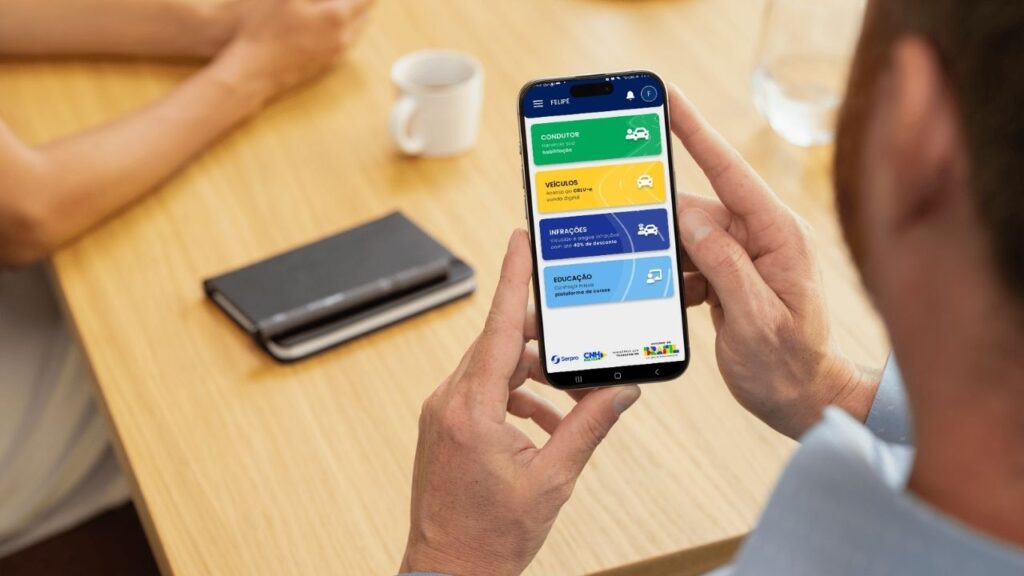
1️⃣ On the homepage, tap “Conductor”.
2️⃣ Select the option “Habilitation”.
3️⃣ Wait for the consultation of the registered data.
4️⃣ If the document is not yet available, follow the validation process presented by the application.
5️⃣ After the release, download the CNH to access it also when you are without internet.
When the data is up to date and the enable is system compatible, the procedure usually takes a few minutes.
CNH Digital has the same legal validity as the printed version. It can be presented in inspections directly by the mobile screen.
What is required to use CNH Digital
Although access is simple, some conditions need to be met for the document to appear correctly.
Usually, the driver needs to have:
- ✅ A CNH registered in the national driver base;
- CPF correctly linked to the document;
- ✅ Active Gov.br account;
- ✅ Personal data compatible between Gov.br and Detran;
- Mobile phone with compatible operating system;
- Internet connection during the first activation.
In some cases, the system may request additional identity validation.This serves to prevent third parties from accessing the license without authorization.
⚠️ When the registration data are different, the CNH may not appear, even if it is valid.
Main features of the CNH Brazil application
The application is not only used to store a digital copy of the driver's license.It gathers documents, queries and services that can facilitate various situations of everyday life.
CNH Digital
In the enabling area, the user can:
- Consult the document data;
- Check category and validity;
- Present the CNH in a surveillance;
- Access the QR Code verification;
- Consult information related to the driver.
After downloading the document, it can remain available even when the phone is disconnected.
CRLV Digital
Those who have a registered vehicle can also access the Vehicle Registration and Licensing Certificate in digital format.
Among the available resources are:
- Vehicle document display;
- Consultation of automobile data;
- Sharing CRLV with another driver;
- Access to the document without having to load the paper.
Sharing can be helpful when someone else drives the vehicle regularly.
⚠️ Infractions and fines
Depending on the integration available, the application allows you to consult infractions related to the driver or the vehicle.
The user can find information such as:
- Date of infringement;
- Registration location;
- Responsible body;
- Amount of fine;
- Payment situation;
- Applied score.
Some services may redirect the driver to the portal of the responsible transit agency.
🔄 Enabling processes and services
The app can also display information about ongoing procedures, including:
- CNH Renewal;
- Document issuance;
- Cadastral updates;
- Qualification situation;
- Expiration notices;
- Pendencies registered in the system.
The availability of each resource depends on the rules and the Detran integration of each state.
Who can use the CNH app in Brazil
The application serves both qualified drivers and owners of vehicles that have documents registered in the official bases.
It can be used by those who:
- 👤 Has valid or expired CNH registered in the system;
- has vehicle with CRLV available digitally;
- 🔐 Keeps a Gov.br account active;
- 📲 Has a mobile phone compatible with the application.
Brazilians and foreigners with CPF and regular documentation can also access the services available for their profile.
It is not mandatory to have a vehicle to use CNH Digital. Similarly, a person without a license, but owner of a car, can have access to certain features related to the vehicle.
How to find your license after login
Once CNH is added, daily access is simple.
Open the app and do the following:
1️⃣ Enter the area “Conductor”.
2️⃣ Tap “Habilitation”.
3️⃣ Enter the access key or use the biometrics of the device.
The document will appear on the screen with the main information of the habilitation.
to avoid problems during a transit approach, keep your phone charged and confirm in advance that CNH has been downloaded for offline access.
Advantages of using the application
Keeping documents on mobile offers benefits that go beyond practicality.
Among the main ones are:
- 📱 Quick access to the license;
- 🔐 Password or biometric protection;
- 🌐 Offline consultation after download;
- CNH and CRLV gathered in the same application;
- Receipt of important notices;
- 💸 Reduction of impressions and displacements;
- Monitoring of some digital processes.
The app also reduces the risk of forgetting the physical document, as long as the phone is working and the digital version is properly activated.
Why CNH may not appear in the app
One of the most frequent problems happens when the user enters the account but does not find the enablement.
The most common causes are:
- ❌ Divergent data in the Detran register;
- CPF incorrectly reported;
- ❌ Failed to validate the Gov.br account;
- Old document without digital integration;
- ❌ Outdated application;
- Temporary instability of the system;
- ❌ Trend in the issuance or renewal of CNH.
When this occurs, close the app, check for available update, and try again.
If the problem continues, please refer to your state's Detran portal to confirm that the personal data and document status are correct.
What to do when the application has an error
Not every failure means that the application is faulty.Often, the problem is related to registration, connection or identity validation.
These measures can help:
- 🔄 Update the application by the official store;
- 📶 Test another internet connection;
- Confirm that you can enter Gov.br normally;
- 🧹 Clear the app cache on Android;
- Restart the appliance;
- 📝 Check the data registered in Detran;
- Reinstall the application if the error persists.
Avoid giving your password or sending documents to people who promise to release CNH Digital for payment.
Care to use the app safely
As the application gathers personal documents, some security practices are indispensable.
- do not share your Gov.br password;
- 👁️ Avoid opening the document on third-party phones;
- 📥 Download only from official stores;
- Do not use an easy-to-guess access key;
- 📲 Keep the device system up to date;
- Be wary of links received by messages;
- Activate biometrics when available.
The CNH Brazil application works as a central document and services for drivers.With the correct installation, the updated data and the Gov.br account working, the driver can access the license, consult vehicle information and follow different procedures directly by mobile.ra solve issues of your license without bureaucracy. Knowing how to download and use correctly is what allows you to enjoy everything he offers on a daily basis.
