Announcements
Many people install the FGTS application and discover there something they did not expect: money stopped from old jobs or deposits that were being made without the person accompanying.
How to check the balance of FGTS by the application
Checking the FGTS balance through the application is a quick process and can be done in a few steps.
After installing the application and accessing your account, follow this path within the system:
1️⃣ Open the FGTS App on mobile
👉 Android: https://play.google.com/store/apps/details?id=br.gov.caixa.fgts.worker&hl=en_BR
👉iOS: https://apps.apple.com/br/app/fgts/id1038441027
2️⃣ Log in with CPF and password
3️⃣ On the home screen, locate the option “Total FGTS”
4️⃣ Tap to view your accounts
The application will display immediately:
➡️ total available balance
accounts linked to your CPF
➡️ values of each FGTS account
Usually this information appears right on the home screen of the application, making it easier to access.
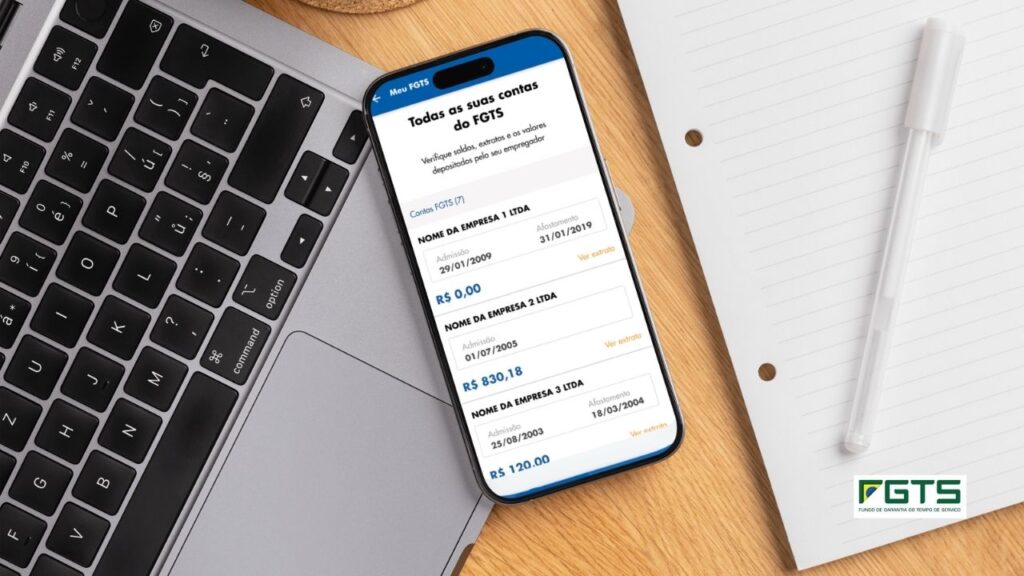
How to view all FGTS accounts
When checking the balance, the application also shows all accounts linked to the worker.
These accounts can be of two types:
📱 Active accounts: These are accounts linked to current employment.
As long as the employment contract is active, the company must continue to make deposits monthly.
inactive accounts: These are accounts related to old jobs.
Even after the termination of the employment contract, the money remains registered in the FGTS system.
Within the app, each account appears separately, allowing the worker to see:
company responsible for deposits
🔷 accumulated balance
🔷 date of deposits
This helps you understand exactly where each recorded value came from.

How to see the complete FGTS extract
In addition to the total balance, the application also allows you to access the detailed account statement.
To view the extract:
1️⃣ Access the account you want to consult
2️⃣ Tap the option “Ver” extract
3️⃣ Scroll the screen to see the history of movements
The extract presents information such as:
monthly deposits made by the company
monetary corrections applied to the balance
any withdrawals made
This history can help you better understand how the balance has been formed over time.
Many people use the extract precisely to check if all the mandatory deposits were made correctly.
How to check if the company is depositing the FGTS correctly
Every employee with a formal contract must receive monthly deposits at FGTS.
These deposits correspond to 8% of gross salary they must be done by the employer every month.
When accessing the extract in the application, you can check:
if deposits are being made regularly
if there are months without payment
if the values seem correct
If a month appears without deposit or with unexpected value, it may be important to investigate the situation. In this case, the worker can seek more information or guidance.
What to do if the balance of FGTS seems incorrect
In some cases, the worker may notice that the balance presented in the app looks different than expected.
This can happen for a few reasons:
recent deposits not yet updated
salary differences throughout the contract
❌ registration error
❌ delay in recording movements
Before drawing conclusions, it is worth considering that the system may take a few days to update new information.
If the problem continues, some actions can help:
✔ double check the complete extract
✔ confirm hiring and shutdown dates
✔ check values recorded in history
If there are still doubts, it may be necessary to seek specialized care or guidance.
Tips to follow the FGTS regularly
Many people only consult the FGTS when they need to withdraw some value.
However, regularly following this information can bring some advantages.
Some good practices include:
access the application periodically
📱 check extracts from time to time
check deposits made by the company
📱 track recorded movements
This monitoring helps the worker to better understand how the FGTS is being formed throughout their professional life.
Situations in which it is worth consulting the balance
There are specific times when consulting the FGTS balance can be especially useful. Some examples include:
start of a new job
📌 termination of employment contract
📌 before requesting any withdrawal
when there are doubts about deposits
In these situations, the application works as a quick tool to check important information.
Checking the FGTS balance through the application is one of the fastest ways to track the amounts linked to your work history.In a few minutes, you can view old accounts, check deposits and better understand how the balance was formed.
Maintaining this monitoring helps the worker to have more clarity about the deposits made and the amounts that are part of his Guarantee Fund.