Announcements
The vehicle document is on the cell phone, but that doubt hits: what if the phone unloads or locks during an inspection? This concern is more common than it seems.
How to print CRLV Digital in minutes
Printing the Digital CRLV is a fast process and can be done directly by mobile phone or computer.
The document is available in PDF format and can be printed on plain paper, maintaining the same legal validity as the digital document.
See how to do it.
1️⃣ Access the document application: Open app CNH of Brazil on your cell phone.
👉 Android: https://play.google.com/store/apps/details?id=br.gov.serpro.cnhe&hl=en_BR
👉 IOS: https://apps.apple.com/br/app/cnh-do-brasil/id1275057217
Log in with your gov.br account and locate the vehicle in the list of documents.
2️⃣ Open CRLV Digital: Inside the app, select the vehicle document.
There will usually be an option for:
✅ view the document
✅ download the file in PDF
✅ share the document
Choose the option of download PDF.
3️⃣ Save the document on your mobile phone or computer: After downloading the file, you can:
save the document on the mobile phone
send the PDF to your computer
forward to print
This file is the official document and can be printed normally.
4️⃣ Print document: With the PDF file open, simply send to a printer.
The document can be printed on:
ordinary A4 paper
home printer or graphic
📄 black and white or colored
The most important point is to ensure that all information is legible, mainly the QR Code of the document.
Does the printed CRLV have validity?
Yes. The printed CRLV has legal validity and can be presented during a traffic inspection.
The printed document contains all the information needed for vehicle verification, including the QR Code which allows agents to confirm the data in the system.
This means that both the digital and the printed version can be used as normal.

Difference between digital and printed CRLV
To help you better understand when each version might be useful, see the comparison below.
| Characteristic | Digital CRLV | CRLV Printed |
|---|---|---|
| Where it is stored | Application on mobile | Physical paper document |
| Need battery | Yes | No |
| Works offline | Yes, after downloading | Yes |
| Ease of access | Very fast by cell phone | Depends on keeping the document |
| Loss risk | Bass | It can tear or be lost |
When it is worth having the CRLV printed
While the digital document is sufficient, the printed version can be useful in a variety of situations.
🚗 When someone else drives the vehicle: If family members or employees use the car, having the document printed makes it easier to access.
🔋 When the phone is out of battery: On long trips or daily commutes, the mobile phone can download. In this case, the printed version avoids problems.
📶 When there are problems with applications: In some rare cases, applications may experience failures or connection problems.
Having the physical document ensures immediate access.
Common errors when printing CRLV
Some errors can make the document difficult to verify during an inspection.
Among the most common are:
printing with low quality
QR Code blurred or unreadable
cutting parts of the document
incomplete printing
To avoid these problems, always check the document after printing.
The ideal is to ensure that:
- all data is visible
- the QR Code is clear
- the document is complete
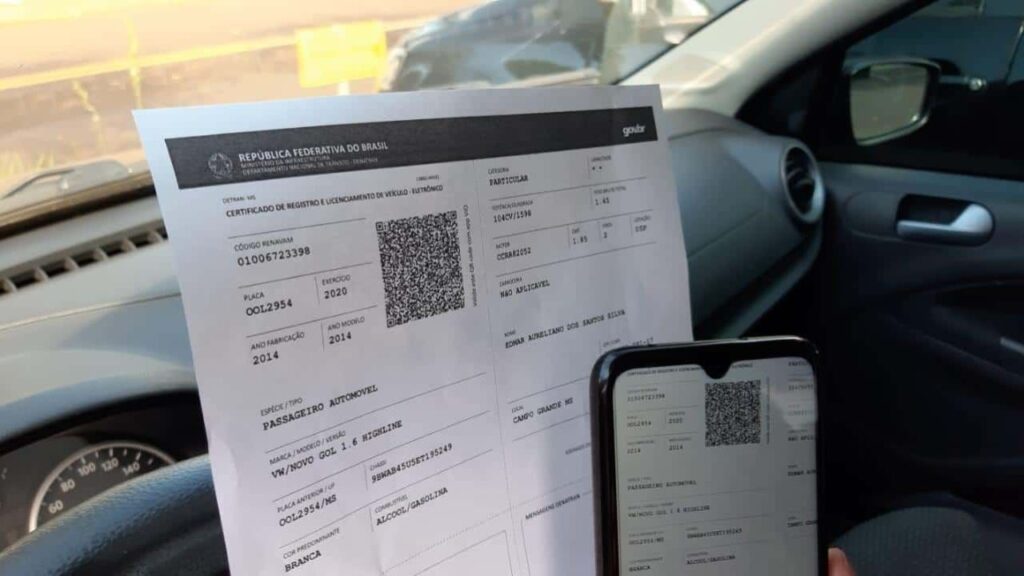
Simple tip to avoid unforeseen events
Good practice is to keep two ways to access the document:
digital version on mobile
copy printed on the vehicle
So, regardless of the situation, the document will always be available.
This little care can avoid delays and complications during transit approaches.
Having the Digital CRLV available on mobile already solves most everyday situations. Still, keeping a printed copy can be a practical alternative to ensure access to the document in any circumstance.
With the saved file and a simple print on plain paper, the driver now has an additional option to present the document whenever necessary.